Every layer of Orchen, in detail.
Everything under the hood: how the AI is built to teach, what the insight layer actually computes, how six roles are scoped, and the compliance posture your security review will sign off on.
For IT directors, curriculum leads, and school heads in active evaluation.
A chat surface, an assignment shelf, a flashcard library, and a private workspace.
Students see Orchen as a conversation. Behind it: a system that adapts to how they think, an assignment workflow their teachers configured, a flashcard library built automatically from their chats, and a private workspace that belongs to the student alone.
Guides through questions, not answers
The Socratic pattern is hard-coded into the system architecture, a commitment deeper than any setting. Even the most creative “just give me the answer” prompt gets a guiding question back.
Four modes, selected in real time
Verbal exploration, structured guidance, examples-first, step-by-step, chosen in real time from the student's response patterns. A student who learns by example sees examples first.
Teacher assignments in the sidebar
When a teacher creates an assignment it appears in the student's sidebar with a Launch screen. Work, submission, and reflection all happen in-chat.
Concepts extracted, graded semantically
Orchen extracts key concepts from sessions and offers to save them as flashcards, grouped by subject. Quizzes use semantic grading, not exact-word matching.
Goals and a journal that stay the student's alone
Students set goals, keep a private journal, and tune their own preferences. None of it is visible to teachers, advisors, or parents unless the student shares it.
Images handled natively
Students upload images alongside their messages and the AI handles them natively. A student stuck on a physics diagram can photograph it and Orchen guides accordingly.
A set of specific rules in the AI's system prompt and the product's structure. Each is operational, not aspirational.
Asks before it answers
The AI's first move is to ask what the student has tried, understands, or is stuck on. Only after they engage does Orchen begin to guide.
Two wrong answers, then a new approach
After two consecutive wrong answers on the same concept, Orchen switches approaches, different example, framing, entry point, instead of the same dead end.
Two question types, two responses
Conceptual questions ("why does this work?") get unpacked through reasoning. Mechanical questions ("how do I compute this?") get scaffolded through steps.
The example stops before the last step
Rather than a complete example to copy, Orchen works partial examples that stop short. The student finishes, preserving the productive struggle learning requires.
When the student has it, Orchen stops
Once a student reaches the answer through their own work, Orchen recognizes it and stops guiding. Recognition is part of the pedagogy.
The prompt extends per discipline
The system prompt extends differently for math, writing, science, and history. Writing gets prewriting scaffolds; math gets worked-example logic.
Three kinds, each carrying metadata
Each assignment carries lesson context, key concepts, vocabulary, common misconceptions, success criteria, a scenario hook, and a parent-friendly explanation.
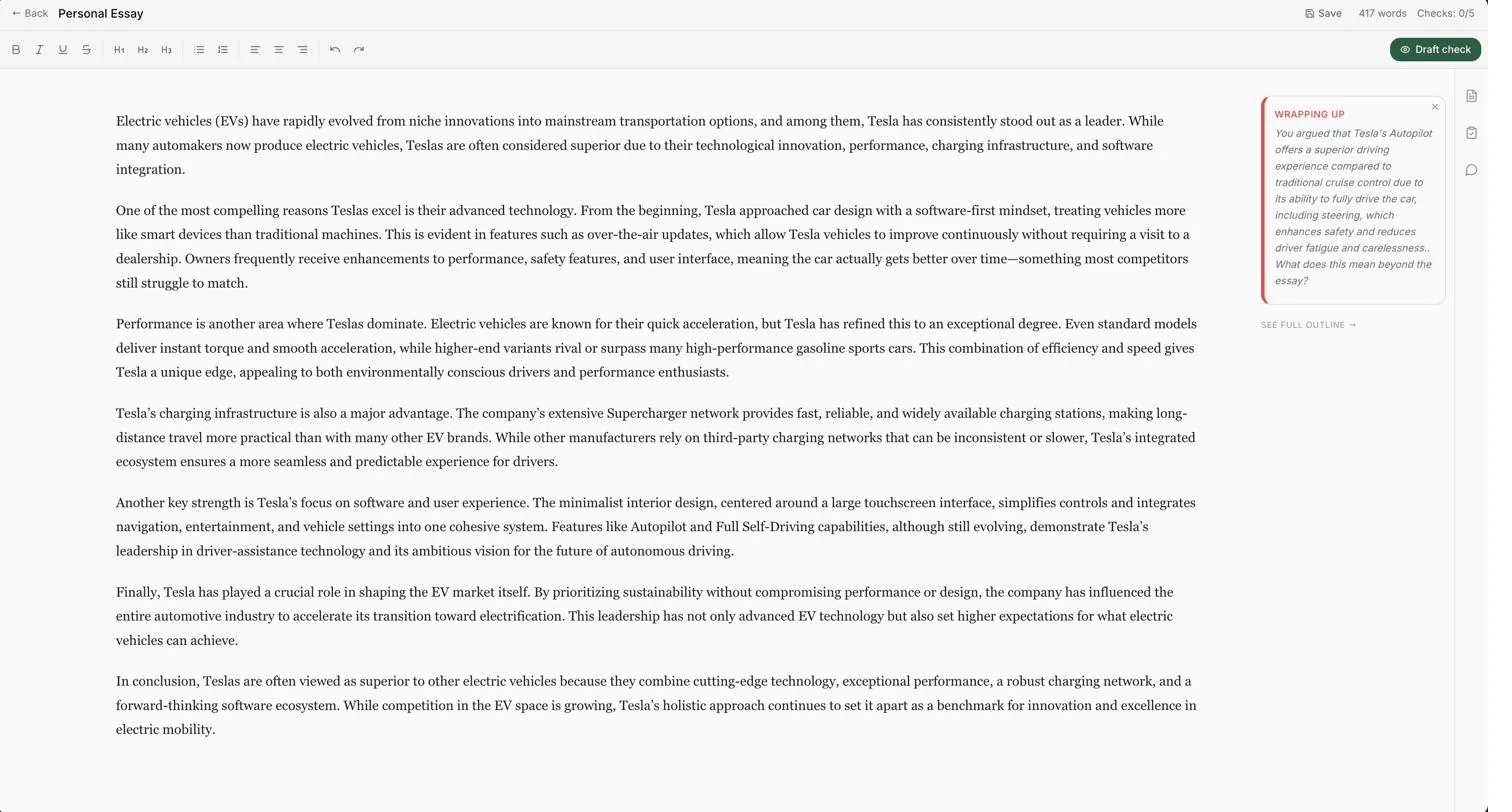
A dedicated, rubric-aware essay surface
TipTap editing, prewriting worksheets (explore → thesis → outline → ready), rubric-scored draft checks, inline comments, and configurable mechanical feedback.
Structured insight, computed nightly, surfaced where it matters.
Every conversation feeds an analysis pipeline that produces structured insight, learning profiles, concept distributions, struggle and strength tags. Source conversations are deleted within seven days; what remains is the synthesis.
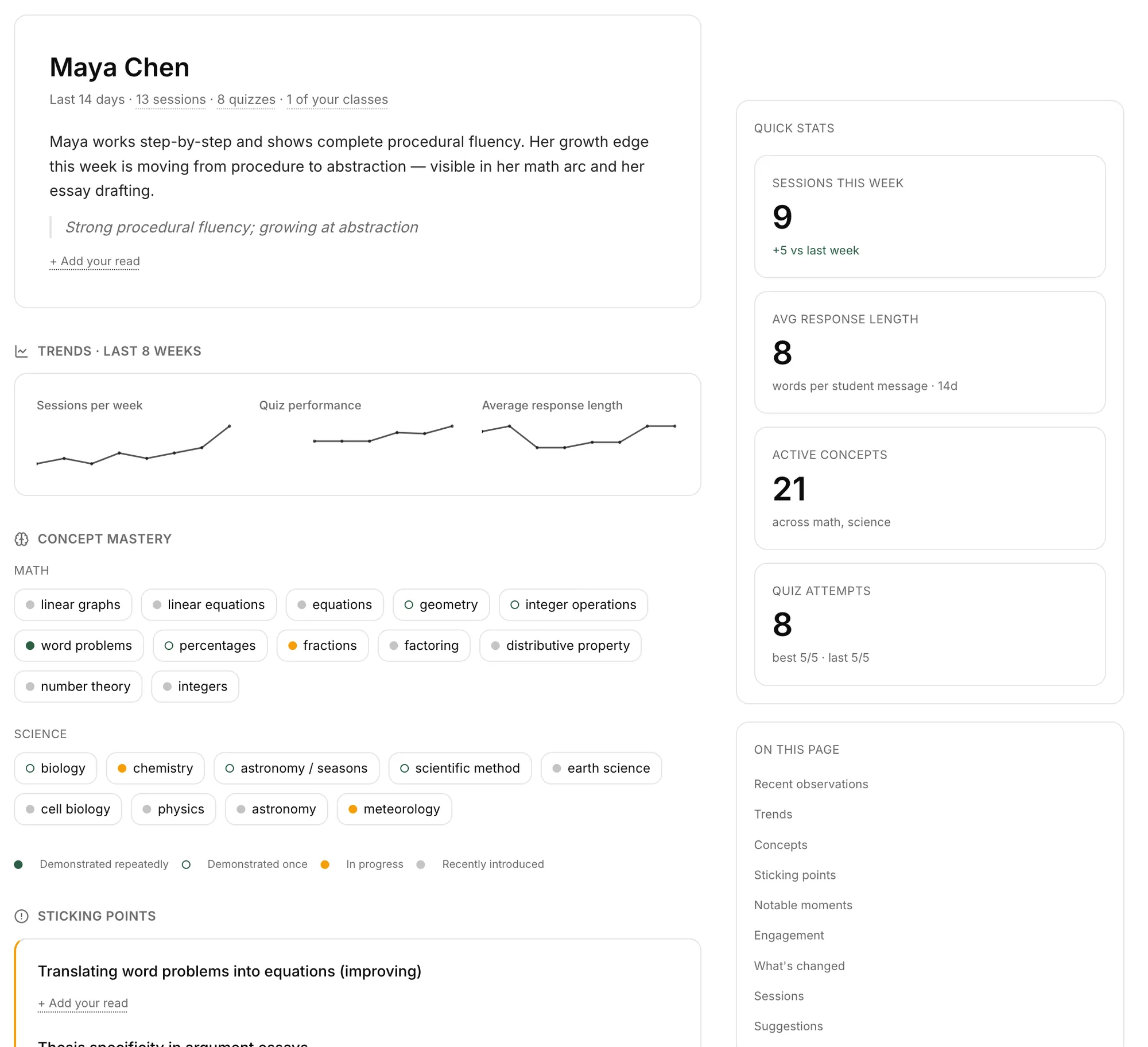
Illustrative distribution across the four evidence levels.
Pace, examples, modality, and what works
Each profile captures pace, preferred examples, modality (verbal, visual, example-based, step-by-step, conceptual), and the guidance that works. It updates continuously as the student interacts.
Four buckets, not a leaderboard
Every concept across every conversation is tracked into one of four buckets. Teachers see the class as a distribution, not a ranking of who scored what.
Tagged by subject, surfaced as chips
Topics where the student gets stuck or excels, tagged by subject and updated as patterns become clear, shown as colored chips on the advisor dashboard and in the weekly narrative.
A structured narrative per advisee
Independent effort, curiosity depth, critical-engagement signals, and any concerning patterns, generated automatically from interaction data, not surveys or self-reports.
Years of trajectory, synthesized
A senior who has used Orchen since freshman year has a four-year trajectory captured as structured insight, a synthesis of how their thinking changed, not transcripts to scroll.
Tags update as the conversation evolves
Conversations are re-classified every five student messages, so the sidebar stays organized without the student having to maintain it.
Every conversation scanned, every flag tracked
Every conversation is scanned for concerning content, self-harm indicators, distress signals, references to harm by others. Detected content is flagged automatically and routed to the school's designated counselor, carrying a 24-hour urgency indicator and moving through a full lifecycle (open, reviewing, resolved, or escalated).
Six roles. Each sees only what their role needs to see.
The data model is organized around six roles, each with a defined view of student data, scoped, narrative, synthesized. The boundaries are enforced architecturally, not through policy documents.
| Role | What they see | Where the boundary is |
|---|---|---|
| Student | Own conversations, flashcards, assignments, goals, and private journal. | Nothing about other students. The private workspace is invisible to every other role unless the student shares it. |
| Teacher | Structured insight for their classes, profiles, concept distributions, session summaries, struggle/strength areas, assignment progress, rubric scores. | No raw transcripts unless the student or school explicitly grants access. |
| Advisor | Weekly synthesized narratives for each advisee, immediate crisis flags, and parent-note tools. | Shared sessions only, students choose what to share. |
| Parent | Weekly digests at the school's visibility level: conversation starters, techniques, subject activity, overdue assignments. | Five visibility tiers; the school sets the default and the ceiling any parent can request. |
| School admin | School-level configuration: AI identity, mechanical-feedback toggles, parent visibility, crisis routing, white-label branding. | School-scoped, no access across other schools. |
| App admin | Full user management with audit logging (Orchen team). | Service-role isolated; never views conversations except documented, logged, privacy-bounded review. |
Behavior is configured at the school level, what the AI looks like, what parents see, how feedback is delivered, where flags go, and how it's branded.
A tutor that matches your voice
The system prompt defining how Orchen presents itself is configurable per school; premium schools can override the default model. Name, voice, and pedagogical defaults match your institution.
Grammar, punctuation, style, independent
Three categories toggle independently. Flag only grammar, all three, or none, a Writing Studio with or without mechanical highlights, your call.
Five tiers, a default and a ceiling
From summary-only to full transcript. The school sets the default and the maximum any parent can request, and can require student notification on an upgrade.
Flags stay in your designated chain
Schools designate the counselor or safeguarding lead who receives flags. The urgency indicator and lifecycle tracking are configurable; crisis content never leaves the chain.
The AI presents as the school's tutor
Premium schools show their own logo and name above every Orchen message. The school's brand sits where Orchen's would, so the AI presents as the school's tutor, not a generic product.
Supabase Postgres with strict row-level security, immutable audit logging, per-school retention, and a service-role isolation model.
RLS enforced at the Postgres level
Every table has RLS policies. Role-based access is checked via SECURITY DEFINER helpers to prevent recursion; service-role operations are isolated from user-facing access and cannot accidentally cross.
Insert-only, RPC-mediated
Every staff access is logged via log_audit_event. The audit_log table is insert-only, direct inserts blocked; all writes go through the RPC, which verifies the actor server-side.
Per-school policy, swept nightly
Each school sets retention for messages, sessions, quiz results, and snapshot keep-counts. The pg_cron job runs nightly. Crisis flags are exempt until resolved.
Source deleted within seven days
Source conversations are deleted within seven days of analysis, after the nightly pipeline has distilled them into profiles, concept progress, and narratives. Long-term insight compounds from those distillations, so understanding deepens over the semester with zero need to re-read old chats. Crisis-flagged content is preserved with its context until resolved.
Tracked, versioned, revocable
Every account has a consent_records entry. Students without one enter a non-persistent Guest Mode where conversations are not saved.
Soft-delete, anonymize, export
Accounts can be deleted at any time: soft-delete the profile, anonymize crisis records, trigger retention compliance. A full export is offered before deletion.
Built around the statutory boundaries
Built around FERPA's visibility boundaries and COPPA's under-13 protections. Under-13 schools add restrictions via the role-gate; audit logs satisfy FERPA record-access documentation.
Record preserved, identifier removed
On account deletion, crisis flag history is anonymized rather than deleted, preserving the safeguarding record while removing the personal identifier.
A single conversation, end to end.
The path of one student-AI conversation through Orchen, from creation, through analysis, to deletion. Every step is logged, scoped, and documented.
The student opens a new chat. A session row is created; each message is stored against it with RLS scoping to the student. Visible only to the student.
Messages save as they happen. Topic classification updates every five messages, concept progress increments, crisis detection scans every message. Still the student's private surface.
The pipeline runs nightly: learning profile, concept distribution, and struggle/strength tags update; weekly narratives compile; crisis flags route to the designated counselor.
The source conversation is deleted from the messages table. The session row remains with derived insight attached, the synthesis stays, the conversation that produced it is gone.
Learning profile, concept progress, and longitudinal trajectory remain. The student's own view shows continuing work, flashcards, assignments, goals, not the deleted sources.
The pg_cron job sweeps per the school's policy. Insight may persist for years if configured; source data is already gone.
Student or admin initiates deletion. Profile soft-deletes, crisis flags anonymize, an export is offered. The audit log of the deletion itself persists.
Ready to see it in motion?
A 30-minute walkthrough is the fastest way to verify any of the architecture above against the live product.